

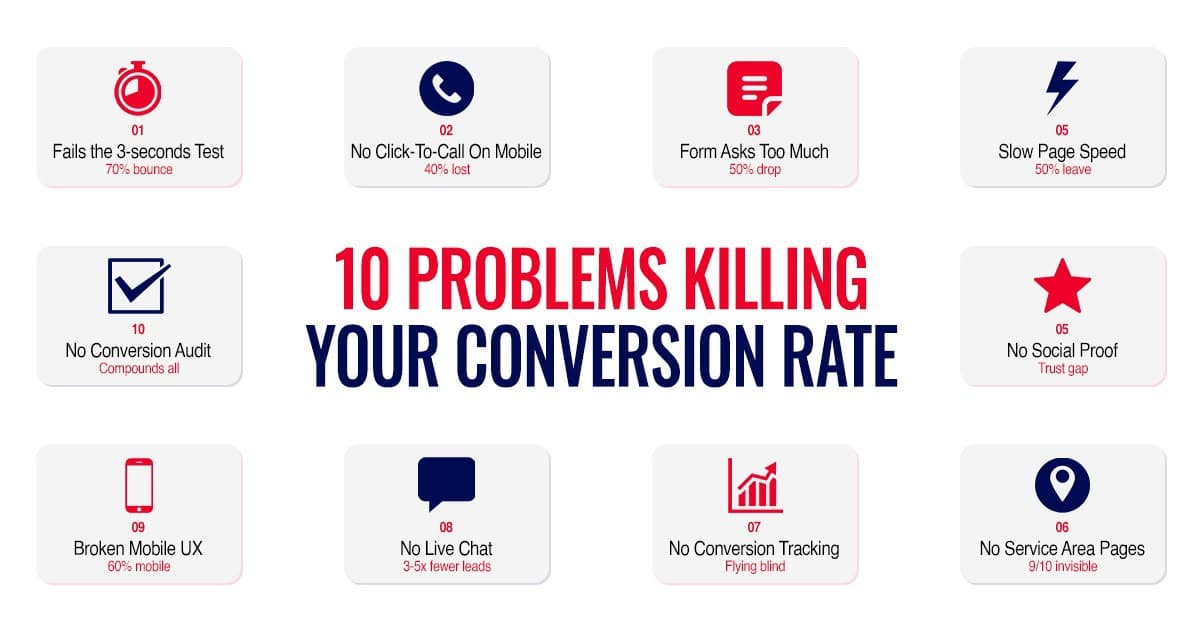
You could have the best Google Ads campaign ever built. You could rank #1 in the Maps 3-pack for every city you service. You could be running Meta retargeting ads that follow every website visitor for 30 days. And none of it matters if your website doesn't convert.
Every ad you run, every organic search result that brings someone to your site, every referral link a partner shares, they all end up at the same place: your website. That's where the decision happens. Call or leave. Fill out the form or bounce. Book the service or go to your competitor.
Most grease trap company websites are silently killing leads every single day. Not because the business is bad. Not because the service is poor. Because the website fails at the one job it has: turning visitors into phone calls and form submissions.
We audit grease trap company websites regularly as part of our UNCLOGGED Growth Audits. The same problems show up over and over. This is what we find, what it's costing you, and exactly how to fix each one.
Problem 01
The 3-Second Test
Open your website on your phone right now. Start a timer. In 3 seconds or less, can a first-time visitor answer these three questions?
01
What do you do?
Headline visible immediately
02
Where do you do it?
Service area named clearly
03
How do I contact you?
Phone + click-to-call button
If all three aren't answered above the fold, the first screen visible without scrolling, your website is failing its most basic job. A restaurant owner with a backed-up grease trap doesn't have time to scroll through your About page, click through your services menu, and hunt for your phone number. They have a kitchen flooding with grease, a health inspector coming, and a line of customers waiting. They will give your website exactly 7 seconds.
The Fix
Your homepage hero section needs three things visible without scrolling on both desktop and mobile: a headline that says what you do (“Commercial Grease Trap Cleaning & Pumping in [City/Region]”), a subheadline or line that names your service area, and your phone number plus a click-to-call button. Everything else on your website is secondary to these three elements.
Problem 02
Click-to-Call on Mobile: The #1 Lead Killer
This is the single most common and most costly problem on grease trap company websites. And it's the easiest to fix.
60%+
On Mobile
More than 60% of grease trap searches happen on mobile.
Restaurant owners are standing in kitchens with backed-up traps. They want one tap to call you. If they have to memorize your number and switch apps, they call the next company instead.
What Most Sites Do
Call us: 555-867-5309
Plain text. Not tappable. User must memorize + switch apps.
What Yours Should Do
Call (555) 867-5309
One tap. Opens dialer. Phone ringing in seconds.
The Fix
Every phone number on your website should be wrapped in a tel: link. Put a prominent click-to-call button in your hero section, in your header (sticky on scroll), and in your footer. On mobile, consider a fixed click-to-call button at the bottom of the screen that stays visible as the visitor scrolls. This one change can increase mobile conversions by 30-40%.
Problem 03
Your Contact Form Is Asking Too Much
We regularly see grease trap company contact forms with 8-12 fields. Name, email, phone, company name, address, city, state, zip, type of service needed, size of grease trap, preferred date, preferred time, how did you hear about us.
Every additional field reduces completion rates. A form with 3 fields converts nearly twice as many visitors as a form with 7+ fields. The restaurant owner with an emergency doesn't want to fill out a census form.
Bloated Form (Don't)
12 fields = ~6% completion rate
Lean Form (Do)
3 fields = ~12% completion rate (2x)
The Fix
Reduce your form to 3-4 fields maximum. Name, phone number, and a dropdown or text field for service needed. That's it. You can collect everything else on the phone when you call them back, which should happen within 5 minutes of submission. The form should be above the fold on your homepage. Not buried on a separate “Contact Us” page.
Problem 04
Page Speed: The Invisible Conversion Killer
A one-second delay in page load time reduces conversions by up to 7%. A three-second delay and more than half your visitors leave before the page even finishes loading. Most grease trap company websites load in 5-8 seconds on mobile.
Test Your Speed Now
Go to pagespeed.web.dev and enter your URL.
Google scores your site out of 100 for mobile + desktop. If your mobile score is below 50, you're losing significant traffic to load time alone.
The Most Common Speed Killers
- Uncompressed images (your hero truck photo is 4MB when it should be 200KB)
- Too many plugins or scripts loading on every page
- No caching configured
- Hosting on a slow, cheap server
- Videos auto-playing on the homepage
The Fix
Compress every image on your site to under 200KB (use TinyPNG or ShortPixel). Enable browser caching. Remove unused plugins. If your site is on budget hosting, upgrade. The cost difference between $5/month and $30/month hosting is negligible compared to lost leads.
Want the full website audit checklist?
The Grease Trap Growth Playbook includes landing page templates, conversion tracking setup, and the audit checklist.
A restaurant owner who finds your website through a Google search has never heard of you. They don't know if you're legitimate. The only thing that overcomes this skepticism is social proof, evidence from other people that you're trustworthy.
What Counts as Social Proof
- Google review rating + count (4.8★, 127 reviews)
- Individual customer testimonials with name + business
- Number of accounts served (200+ restaurants)
- Years in business
- Certifications and licenses
- Association memberships (NASSCO, NAWT)
- Client logos (restaurant chains, hotel brands)
- Awards and recognitions
The Fix
Put your Google rating and review count in the hero section. Add 2-3 short customer testimonials to your homepage (not a separate page). Display certifications and years in business visibly. The goal: within 10 seconds of landing on your site, a visitor sees multiple signals that you're established, trusted, and proven.
Problem 06
No Service Area Pages = Invisible in Most of Your Market
If you service 10 cities but your website only mentions your headquarters city, you're invisible in 9 out of 10 markets. We covered this in depth in our local SEO guide, but it bears repeating here because it's both an SEO issue and a website conversion issue.
When a restaurant owner in a city 25 miles from your office lands on your website, they need to see that you serve their area. If your site says “Serving [home city]” and nothing else, they assume you don't work in their area, even if you do.
The Fix
Create individual service area pages for every city you serve. Each page should mention the city name in the title and headings, describe the types of commercial kitchens you serve there, reference local FOG regulations, and include a CTA with your phone number.
Problem 07
No Conversion Tracking = Flying Blind
Here's a question most grease trap company owners can't answer: how many phone calls did your website generate last month? Not how many total calls you received. How many came specifically from your website.
Google Analytics 4
FreeTracks visitor behavior on your site
Google Ads Conversion Tag
FreeTracks which ad clicks lead to calls + forms
Meta Pixel
FreeTracks visitors to retarget on Facebook + Instagram
Call Tracking (CallRail)
$30–50/moGives each source its own phone number
The Fix
Get these installed. If you're running any paid advertising without conversion tracking, you're spending money with no way to measure results. Our advertising guide covers why call tracking is non-negotiable for grease trap campaigns.
Problem 08
No Live Chat = Losing Emergency Calls
Grease trap emergencies are high-urgency situations. The restaurant owner needs help now. Some prefer calling. Some prefer texting. Some prefer typing into a chat widget because they're in the middle of a busy kitchen and can't step away to make a phone call.
3–5×
Higher Conversion
Live chat converts 3-5x higher than contact forms for service businesses.
In grease trap, where emergencies drive a significant portion of leads, the ability to type “I need emergency service at [address], how fast can you get here?” can win the call.
The Fix
Install a chat widget. Tidio, LiveChat, or GoHighLevel's built-in chat. Configure automated responses for off-hours: “Thanks for reaching out. We'll respond within 15 minutes during business hours. For emergencies, call us at [number].” During business hours, route chat messages to your office manager's phone.
Problem 09
Your Mobile Experience Is Probably Broken
Pull out your phone and go through your own website as if you were a restaurant owner looking for grease trap service. Try to complete these tasks:
Can you tell what the company does within 3 seconds?
Can you tap to call without scrolling?
Can you find and submit the contact form without frustration?
Do all the images load quickly?
Can you read the text without zooming?
Do any popups cover the screen and make you hunt for the close button?
If you failed any of these, your mobile visitors are failing them too, and leaving.
The Fix
Test your site on at least 3 different phone screen sizes (most website builders let you preview this). Make sure your click-to-call button, headline, and primary CTA are all visible on the first screen without scrolling on a standard iPhone or Android screen (375px width). If your site wasn't built mobile-first, it's likely time for a rebuild.
Problem 10
The 10-Point Website Audit Checklist
Run through this checklist on your own website right now. Every “no” is a lead you're losing. Tap each item as you confirm it on your site:
Audit Your Site Live
If you scored 7 or above, your website is ahead of 90% of grease trap company websites. If you scored below 5, your website is actively working against your marketing efforts, every dollar you spend on ads is sending traffic to a site that can't convert it.

Two ways to take the next step
Do It Yourself
Website audit checklist, landing page templates, conversion tracking setup.
Get the PlaybookDone For You
We pull up your site live, run the 10-point checklist together, show you exactly what to fix.
Book the AuditFrequently Asked Questions
It depends on how much needs fixing. Adding a click-to-call button, compressing images, and installing a chat widget can be done in a few hours for under $500. Building service area pages costs $100 to $200 per page if outsourced. A full website rebuild for a grease trap company typically runs $3,000 to $7,000 depending on the number of pages and features needed.
Click-to-call on mobile. If your phone number isn't tappable on a phone screen, you're losing emergency calls every single day. This takes 10 minutes to fix and can increase mobile conversions by 30 to 40 percent.
Yes. Your homepage serves multiple purposes, it introduces your company, lists your services, shows your service area. A landing page has one purpose: convert the ad click into a phone call or form submission. No navigation menu, no distractions, no competing CTAs. Companies that use dedicated landing pages for Google Ads consistently see 2 to 3x higher conversion rates than those sending traffic to their homepage.
Your website is the destination for every marketing effort you'll ever run. Ads, SEO, referral links, social media, they all send people to your site. A website that converts 5% of visitors into leads versus one that converts 1% means five times more customers from the same traffic. At an average customer LTV of $2,400 per year, even a $5,000 website rebuild pays for itself within months.
WordPress with a fast hosting provider (SiteGround, WP Engine, or Cloudways) gives you the most flexibility for SEO, service area pages, and conversion optimization. If you want simplicity, GoHighLevel includes a website builder with built-in forms, chat, and automation. Avoid Wix and Squarespace for service businesses, their SEO limitations and template constraints make it harder to rank for local searches.
Install Google Analytics and call tracking. After 30 days, you'll know exactly how many visitors your site gets, how many call, how many submit forms, and what percentage bounce without doing anything. If your bounce rate is above 60% and your conversion rate is below 3%, your website is the bottleneck.
About the Author
Parth Purohit · Founder, Copper Social
Parth is the founder of Copper Social (coppersocial.ca), the only digital marketing agency in USA, Canada, Australia and several other countries that works exclusively with grease trap and septic service companies. His work has helped a client scale to 3,000+ restaurant clients using the UNCLOGGED Growth Model, the most documented growth case study in the grease trap industry. Want to DIY? Get the Playbook. Want it built for you? Book the Audit.
Problem 05
No Social Proof = No Trust = No Call